> ## Documentation Index
> Fetch the complete documentation index at: https://developer.plugsurfing.com/llms.txt
> Use this file to discover all available pages before exploring further.
# Sessions
Get charging session history, start and stop remote charging sessions and manage session payments.
The Sessions API allows you to:
* Start and stop remote charging sessions
* View charging session history
* Get session details and receipts
* Retry failed payments
## Remote charging
To start a charging session remotely, use the endpoints described below.
After starting or stopping a session, you should listen to [Session Events](./events) to get updates about:
* session started
* session failed to start
* session stopped
* session finished
A session can be started remotely (via the API) but stopped locally by the user, for example from the car itself or by plugging out the charging cable.
That means that you might receive events such as `SESSION_STOPPED` or `SESSION_COMPLETED` without calling the Drive API.
#### Remarks
* The order of events doesn't always follow the sequence outlined in the [Statuses](#session-statuses) section. Events can occur in any order or be skipped entirely. Always consider the most recent update for the accurate status of the session.
* Only chargers with `REMOTE_START_STOP_CAPABLE` [capability](./geosearch#capabilities) can be started and stopped remotely.
* Do not limit the possibility to start charging only to chargers in the `AVAILABLE` status. There can be a delay between status updates, so a charger might be available even if it still shows "OCCUPIED".
* A session might stay in a certain state (like `WAITING_TO_START` or `STOP_FAILED`) for a long time. Ensure your product handles this appropriately and doesn't block the user from starting a session again in such cases.
* After starting a session, all subsequent tries within the next 60 seconds on the same connector are blocked to avoid spamming the CPO with requests. Consider this when designing your integration.
* It is possible to have two or more ongoing sessions simultaneously.
* Once a session is completed and priced, a [CDR (Charge Detail Record)](cdr) is sent.
#### Possible problems
Connections with chargers are not always reliable and stable. Therefore, some errors may occur when using remote start/stop:
* **Session Starting Delays**:
* Starting a session can take some time. Allow up to two minutes for the session to transition from `WAITING_TO_START` to `STARTED`. Some chargers only unlock the cable after starting, so it will stay in `WAITING_TO_START` until the user connects the cable to their car.
* If a charger can't start a session due to connectivity problems or issues with connecting to the car, wait at least one minute before allowing the user to attempt starting a session again.
* If a session stays in `WAITING_TO_START` for more than two minutes, consider it failed and allow starting another one.
* **Session Failures**:
* If the charger didn't receive the stop request and charging continues while the session is marked as failed, the user should be able to send a STOP request again.
* If a session stays in `STOP_FAILED` status for a few minutes, the user should still be able to start another session.
* If a charger received a stop request but a timeout occurred and the session is marked as `STOP_FAILED`, another event about the session being stopped or completed should follow.
* **Mixed Session Outcomes**:
* It is possible to receive a `SESSION_START_FAILED` event followed by a `SESSION_COMPLETE` event and have a successful charging session. This can happen if there are connection issues between the charging point operator (CPO) and the charger, but the charger was still able to charge.
* If a session doesn't stop correctly after a few tries, allow the user to abandon the session so that it is possible to start another one.
## Start remote session
[**API Reference**](/reference/startRemoteSession)
Start a remote charging session for a given user on a given connector id. The response from this endpoint will always include a session id regardless if the start was successful or not (all session attempts are stored).
You should store that session id to be able to check its status, stop charging, etc.
## Stop remote session
[**API Reference**](/reference/stopRemoteSession)
Stop a remote charging session given its session id. Only sessions started remotely can be remotely stopped.
Remotely started sessions have the `chargingKeyType` field set to `virtual`.
Calling this endpoint with a session id pointing to an already stopped session will not cause any harm, a 200 - OK response will be returned again.
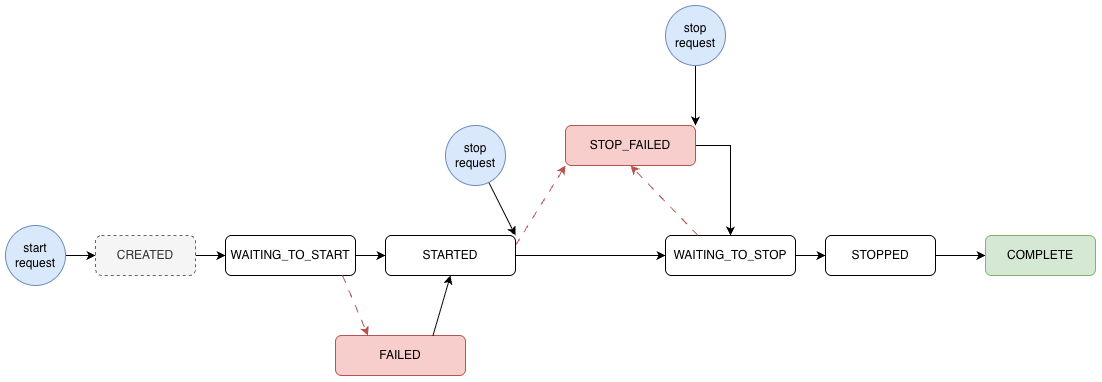
## Session statuses
The status Enum **should** be designed to accept unknown values. In case a new status is introduced, handle these unknown values as FAILED.
* `CREATED` – transitive state that indicates that Plugsurfing created the session. It remains for a very short time
* `WAITING_TO_START` – indicates that Plugsurfing asked the CPO to start a remote session (only for Remote Charging)
* `STARTED` – indicates that the session is ongoing
* `WAITING_TO_STOP` – indicates that Plugsurfing asked the CPO to stop a remote session (only for Remote Charging)
* `STOP_FAILED` – indicates that stopping the remote session failed (only for Remote Charging). A new stop request can be retried.
* `STOPPED` – indicates that the session has ended, but the CDR was not yet received
* `COMPLETE` – indicates that the session is fully completed and priced. Use the `balanceStatus` and the `balanceAmountMinor` to assess if the payment is currently successful or not.
* `FAILED` – indicates that the session couldn't be started
* `REFUNDED` – indicates that the session payment was refunded to the user
* `UNKNOWN` – indicates an unrecognized status. It should be treated the same as FAILED
 ## Get Session history
[**API Reference**](/reference/listSessions)
The session history API allows you to:
* View all charging sessions of a given user
* Filter by charging key, date range, and status
* Get session details like energy consumed, duration and cost
## Get session by id
[**API Reference**](/reference/getSessionById)
Retrieve a session details by its id. The response will indicate whether the session is starting, started, failed, or complete.
When a session is complete, you will also have an additional field called `balanceStatus` which will give you the payment state as one of 4 options (PROCESSING, PAID, DEBT, REFUND).
Example of session in STARTED state:
```json theme={null}
{
"sessionStatus": "STARTED",
"charger": {
"chargingStationName": "ZzZ 220218114136937169",
"connectorLabel": "1",
"evseId": "NO*XXX*EZzZ220218114136937169*1"
},
"connectorId": "abcJd/vR5fvzBa0X/gxaXA==",
"duration": "PT21.379S",
"receiptAvailable": false,
"sessionId": "LWO89J3mDJr",
"site": "ZzZ 220218114135485264",
"startTime": "2022-06-07T06:49:59.811Z"
}
```
Example of session in COMPLETED state:
```json theme={null}
{
"sessionStatus": "COMPLETE",
"balanceStatus": "PAID",
"charger": {
"chargingStationName": "ZzZ 220218114136937169",
"connectorLabel": "1",
"evseId": "NO*XXX*EZzZ220218114136937169*1"
},
"connectorId": "abcJd/vR5fvzBa0X/gxaXA==",
"duration": "PT15M",
"energy": {
"unit": "WH",
"value": 1840
},
"price": {
"currencyCode": "NOK",
"minorExclVat": 0,
"minorInclVat": 0,
"vat": "25"
},
"receiptAvailable": false,
"sessionId": "LWO89J3mDJr",
"site": "ZzZ 220218114135485264",
"startTime": "2022-02-18T10:41:39.148Z"
}
```
## Get a session receipt by sessionId
[**API Reference**](/reference/getSessionReceipt)
Retrieve a session receipt URL. The receipt will be in PDF format.
## Testing remote charging
To test remote charging, you should start charging sessions on specific connectors in our the stage environment. Here are the steps required to test remote charging:
1. Find a charger via geosearch
2. Select an available charger and get its connector id
3. Start the session
4. Wait a desired amount of time
5. Stop the session
Here are details on how to test a successful session and how to simulate error scenarios.
### Successful session
Firstly, search for available locations around the following coordinates with the [Geosearch radius endpoint](/reference/searchLocationsByRadius):
```
Latitude: 52.290056
Longitude: 20.907028
Distance: 500
```
```Curl theme={null}
curl --request POST \
--url 'https://drive-api-stage.plugsurfing.com/drive/v1/geosearch/radius?latitude=52.290056&longitude=20.907028&distance=500&limit=300&aggregate=false' \
--header 'X-API-Key: YourApiKey' \
--header 'accept: */*' \
--header 'content-type: application/json' \
--data '
{
"filters": {
"locationStatuses": [
"AVAILABLE"
]
}
}
'
```
Pick any connector with the `AVAILABLE` status and start a session:
```Curl theme={null}
curl -X POST --location "https://drive-api-stage.plugsurfing.com/drive/v1/users//sessions/start" \
-H "x-api-key: " \
-H "Content-Type: application/json" \
-d "{
\"connectorId\": \"RfZBL8BkRQrTa//7TOadw3oiP51NudvmvpRC5WI3TsawwqypdT1Qwa3ck8cchZpEH2JGytmok239REYlPWleVQ==\"
}"
```
A session id will be returned. You can use this session id in the [Get session by id](/reference/getSessionById) endpoint. That should indicate that the session in "STARTED" state:
```json theme={null}
{
"sessionStatus": "STARTED",
"charger": {
"chargingStationName": "Charge at the castle",
"city": "Stockholm",
"evseId": "SE*REM*E1000",
"streetName": "Kungliga slottet"
},
"connectorId": "+YePNZexUkx8U9fCUoBEmu8EVhBUn1TWdxjd5Ky1ly1Tm3r2MApUUkDIzO4IqizV3l4XTQ87QmotRFvUW1SCWA==",
"duration": "PT12.333S",
"receiptAvailable": false,
"sessionId": "NbmNQa80MwR",
"site": "Charge at the castle",
"startTime": "2023-02-24T13:14:14Z"
}
```
### Error case
There is one location designated for simulating errors, it is located at:
```
Latitude: 52.334242
Longitude: 20.899305
```
Below are 4 specific error scenarios which can be tested. Each are assigned on a different charger (EVSE):
* Waiting to start hanging: `DE*DRV*E6mayTt`
* Stop ignored (rejected): `DE*DRV*E4JanRe`
* Start fails: `DE*DRV*E9svnVs`
* Stop fails: `DE*DRV*E8vsnVn`
Below the error scenarios are described in more detail:
##### 1. Waiting to start hanging:
1. Select any connector id from evse\_id `DE*DRV*E6mayTt` and initiate a charging session
2. Obtain the session id from the response and get session details using session API request
3. Status of charging should be `WAITING_TO_START`
##### Example request
```Curl theme={null}
curl -X 'POST' \
'https://drive-api-stage.plugsurfing.com/drive/v1/users//sessions/start' \
-H 'X-API-Key: ' \
-d '{
"connectorId": "RfZBL8BkRQrTa//7TOadw3oiP51NudvmvpRC5WI3TsYcqfRqeQ1Z/hmFFk/Lu+ZjAmz+8p9htX8Wmh0rzSdKGQ=="
}'
```
##### 2. Stop ignored (rejected):
1. Select any connector id from evse\_id `DE*DRV*E4JanRe` and initiate a charging session
2. Obtain the session id from the response and trigger a stop session
3. Enter the same session id in the Get session by ID endpoint request and check the status
4. Status of charging should still be `STARTED` as stop request is ignored
##### 3) Start fails:
1. Select any connector id from evse\_id `DE*DRV*E9svnVs` and initiate a charging session
2. Obtain the session id from the response and get session details using session API request
3. Status of charging should be `FAILED` as starting a charging session failed
##### 4) Stop fails:
1. Select any connector id from evse\_id `DE*DRV*E8vsnVn` and initiate a charging session
2. Obtain the session id from the response and trigger a stop session
3. Enter the same session id in get session API request and check the status
4. Status of charging should be `STOP_FAILED` as stop request fails
## Testing local charging
Local charging cannot be tested in the staging environment. To perform local charging tests, you need to use physical charging keys on actual chargers.
This documentation is built and hosted on [Mintlify](https://mintlify.com), a developer documentation platform.
## Get Session history
[**API Reference**](/reference/listSessions)
The session history API allows you to:
* View all charging sessions of a given user
* Filter by charging key, date range, and status
* Get session details like energy consumed, duration and cost
## Get session by id
[**API Reference**](/reference/getSessionById)
Retrieve a session details by its id. The response will indicate whether the session is starting, started, failed, or complete.
When a session is complete, you will also have an additional field called `balanceStatus` which will give you the payment state as one of 4 options (PROCESSING, PAID, DEBT, REFUND).
Example of session in STARTED state:
```json theme={null}
{
"sessionStatus": "STARTED",
"charger": {
"chargingStationName": "ZzZ 220218114136937169",
"connectorLabel": "1",
"evseId": "NO*XXX*EZzZ220218114136937169*1"
},
"connectorId": "abcJd/vR5fvzBa0X/gxaXA==",
"duration": "PT21.379S",
"receiptAvailable": false,
"sessionId": "LWO89J3mDJr",
"site": "ZzZ 220218114135485264",
"startTime": "2022-06-07T06:49:59.811Z"
}
```
Example of session in COMPLETED state:
```json theme={null}
{
"sessionStatus": "COMPLETE",
"balanceStatus": "PAID",
"charger": {
"chargingStationName": "ZzZ 220218114136937169",
"connectorLabel": "1",
"evseId": "NO*XXX*EZzZ220218114136937169*1"
},
"connectorId": "abcJd/vR5fvzBa0X/gxaXA==",
"duration": "PT15M",
"energy": {
"unit": "WH",
"value": 1840
},
"price": {
"currencyCode": "NOK",
"minorExclVat": 0,
"minorInclVat": 0,
"vat": "25"
},
"receiptAvailable": false,
"sessionId": "LWO89J3mDJr",
"site": "ZzZ 220218114135485264",
"startTime": "2022-02-18T10:41:39.148Z"
}
```
## Get a session receipt by sessionId
[**API Reference**](/reference/getSessionReceipt)
Retrieve a session receipt URL. The receipt will be in PDF format.
## Testing remote charging
To test remote charging, you should start charging sessions on specific connectors in our the stage environment. Here are the steps required to test remote charging:
1. Find a charger via geosearch
2. Select an available charger and get its connector id
3. Start the session
4. Wait a desired amount of time
5. Stop the session
Here are details on how to test a successful session and how to simulate error scenarios.
### Successful session
Firstly, search for available locations around the following coordinates with the [Geosearch radius endpoint](/reference/searchLocationsByRadius):
```
Latitude: 52.290056
Longitude: 20.907028
Distance: 500
```
```Curl theme={null}
curl --request POST \
--url 'https://drive-api-stage.plugsurfing.com/drive/v1/geosearch/radius?latitude=52.290056&longitude=20.907028&distance=500&limit=300&aggregate=false' \
--header 'X-API-Key: YourApiKey' \
--header 'accept: */*' \
--header 'content-type: application/json' \
--data '
{
"filters": {
"locationStatuses": [
"AVAILABLE"
]
}
}
'
```
Pick any connector with the `AVAILABLE` status and start a session:
```Curl theme={null}
curl -X POST --location "https://drive-api-stage.plugsurfing.com/drive/v1/users//sessions/start" \
-H "x-api-key: " \
-H "Content-Type: application/json" \
-d "{
\"connectorId\": \"RfZBL8BkRQrTa//7TOadw3oiP51NudvmvpRC5WI3TsawwqypdT1Qwa3ck8cchZpEH2JGytmok239REYlPWleVQ==\"
}"
```
A session id will be returned. You can use this session id in the [Get session by id](/reference/getSessionById) endpoint. That should indicate that the session in "STARTED" state:
```json theme={null}
{
"sessionStatus": "STARTED",
"charger": {
"chargingStationName": "Charge at the castle",
"city": "Stockholm",
"evseId": "SE*REM*E1000",
"streetName": "Kungliga slottet"
},
"connectorId": "+YePNZexUkx8U9fCUoBEmu8EVhBUn1TWdxjd5Ky1ly1Tm3r2MApUUkDIzO4IqizV3l4XTQ87QmotRFvUW1SCWA==",
"duration": "PT12.333S",
"receiptAvailable": false,
"sessionId": "NbmNQa80MwR",
"site": "Charge at the castle",
"startTime": "2023-02-24T13:14:14Z"
}
```
### Error case
There is one location designated for simulating errors, it is located at:
```
Latitude: 52.334242
Longitude: 20.899305
```
Below are 4 specific error scenarios which can be tested. Each are assigned on a different charger (EVSE):
* Waiting to start hanging: `DE*DRV*E6mayTt`
* Stop ignored (rejected): `DE*DRV*E4JanRe`
* Start fails: `DE*DRV*E9svnVs`
* Stop fails: `DE*DRV*E8vsnVn`
Below the error scenarios are described in more detail:
##### 1. Waiting to start hanging:
1. Select any connector id from evse\_id `DE*DRV*E6mayTt` and initiate a charging session
2. Obtain the session id from the response and get session details using session API request
3. Status of charging should be `WAITING_TO_START`
##### Example request
```Curl theme={null}
curl -X 'POST' \
'https://drive-api-stage.plugsurfing.com/drive/v1/users//sessions/start' \
-H 'X-API-Key: ' \
-d '{
"connectorId": "RfZBL8BkRQrTa//7TOadw3oiP51NudvmvpRC5WI3TsYcqfRqeQ1Z/hmFFk/Lu+ZjAmz+8p9htX8Wmh0rzSdKGQ=="
}'
```
##### 2. Stop ignored (rejected):
1. Select any connector id from evse\_id `DE*DRV*E4JanRe` and initiate a charging session
2. Obtain the session id from the response and trigger a stop session
3. Enter the same session id in the Get session by ID endpoint request and check the status
4. Status of charging should still be `STARTED` as stop request is ignored
##### 3) Start fails:
1. Select any connector id from evse\_id `DE*DRV*E9svnVs` and initiate a charging session
2. Obtain the session id from the response and get session details using session API request
3. Status of charging should be `FAILED` as starting a charging session failed
##### 4) Stop fails:
1. Select any connector id from evse\_id `DE*DRV*E8vsnVn` and initiate a charging session
2. Obtain the session id from the response and trigger a stop session
3. Enter the same session id in get session API request and check the status
4. Status of charging should be `STOP_FAILED` as stop request fails
## Testing local charging
Local charging cannot be tested in the staging environment. To perform local charging tests, you need to use physical charging keys on actual chargers.
This documentation is built and hosted on [Mintlify](https://mintlify.com), a developer documentation platform.